Install Ready & Rooted
Free. Works with no internet. No account.
✅ Ready & Rooted is installed on this device.
No install needed — the app also works right here in your browser.
Opened from TikTok, Facebook, Instagram or Messenger?
This app (TikTok, Facebook, Instagram, Messenger…) opened Ready & Rooted inside itself, and it can’t install apps from here.
Android
Open in Chrome
- If the button doesn’t work: tap ⋮ or ••• (top corner).
- Tap “Open in browser” or “Open in Chrome”.
iPhone / iPad
- Tap ••• or the Share icon (usually at the top or bottom corner).
- Tap “Open in Safari” (or “Open in browser”).
- Then follow the iPhone steps below.
Link copied! Open Chrome or Safari and paste it in the address bar.
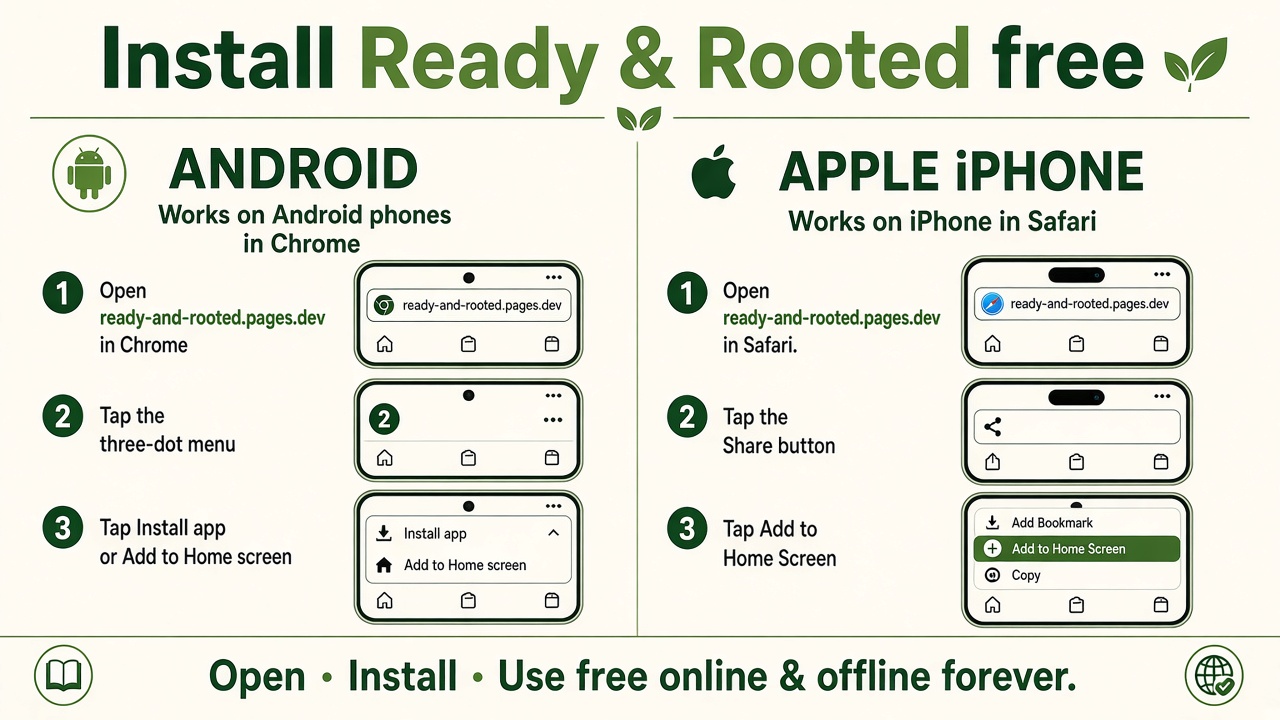
iPhone / iPad
- Tap the Share button
(at the bottom of the screen — if you don’t see it, tap ••• first)
(at the top of the screen, next to the address bar)
- Scroll down the list
- Tap “Add to Home Screen”
- Tap “Add” (top right)
Chrome on iPhone can do it too: tap the Share icon in the address bar, then “Add to Home Screen”.
Android
In Chrome, Edge or Samsung Internet, the big Install app button above usually does it in one tap. If nothing happens:
- Chrome: tap ⋮ (top right) → “Add to Home screen” or “Install app”.
- Samsung Internet: tap ≡ (bottom right) → “Add page to” → “Home screen”.
- Firefox: tap ⋮ → “Install” (or “Add to Home screen”).
- Other browsers: open the browser menu and look for “Install” or “Add to Home screen”.
Computer
Computer: click the install icon at the right end of the address bar, or the browser menu → “Install Ready & Rooted”.
Use Ready & Rooted in my browser now